| 1 |
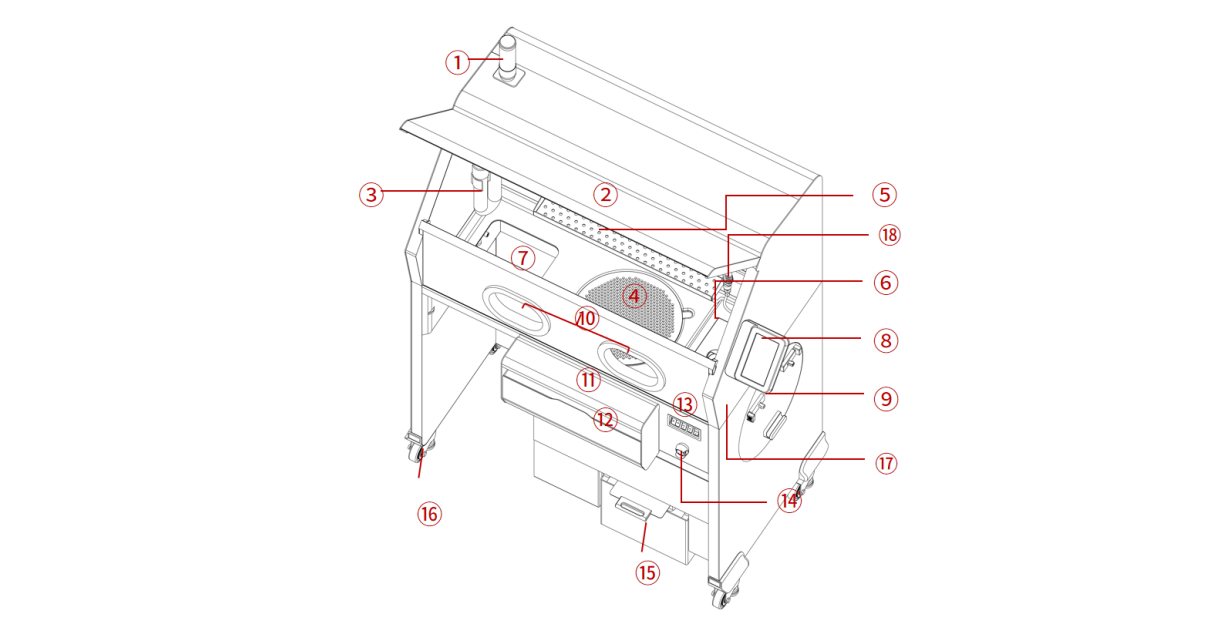
Tower Light (with Buzzer) |
Indicates the current operating status of the equipment.
Green: Normal; Yellow: Action prompt or warning; Red: Abnormal. |
| 2 |
Windshield |
Allows the user to monitor the operating area while preventing powder spillage. |
| 3 |
Vacuum Hose |
Used for vacuum cleaning the operating area (requires connecting an external vacuum cleaner to the cleaning station). |
| 4 |
Screen |
Prevents large parts from entering the vibrating screen. |
| 5 |
Tool Shelf |
Used to store necessary tools and parts. |
| 6 |
Fresh Powder Inlet |
Used to add new powder. |
| 7 |
Cake Inlet |
Lifts powder cake from Build Unit 220 to the operating area. |
| 8 |
Touch Screen |
User interface for controlling the powder cleaning station. |
| 9 |
Powder Mixer |
The powder in the hopper is thoroughly mixed by rotating it. |
| 10 |
Glove Box Access |
Gloves allow users to clean powder cake and dispose of used powder to prevent dust contamination. |
| 11 |
Adjustable armrest |
Elbow support during operation, adjustable in height. |
| 12 |
Toolbox |
Storage for commonly used tools and protective equipment. |
| 13 |
Buttons |
Used for performing common cleaning station operations. |
| 14 |
Emergency Stop |
Used to stop the machine in an emergency. |
| 15 |
Cartridge Drawer |
Used for storing and loading cartridge. |
| 16 |
Castor |
4, for moving the cleaning station. |
| 18 |
Anti-Static Wrist Strap Interface |
For connecting electrostatic wrist straps. |
| 18 |
Air Gun |
Used to clean residual powder or impurities inside equipment, on the surface of parts, and in the gaps of printed parts. |